" height="17.91976170212766px" id="JYDtJ0kpU" transform="translate(32.501 0.765)" width="13.099391709168325px"/><path d="M 3.91 0.013 C 5.547 -0.045 7.959 0.021 8.713 1.809 C 9.073 2.664 8.93 3.806 8.949 4.726 C 8.965 5.544 8.966 6.407 8.919 7.223 C 8.826 8.666 7.94 9.944 6.588 10.479 C 4.649 11.26 1.223 11.416 0.254 9.078 C 0.025 8.579 -0.017 7.943 0.006 7.404 C 0.094 5.339 1.546 4.617 3.371 4.3 C 4.245 4.148 5.453 4.187 6.16 3.548 L 6.169 3.539 C 6.535 2.335 5.47 2.193 4.53 2.188 C 4.109 2.185 3.738 2.292 3.347 2.436 L 2.927 2.937 C 2.083 2.978 1.156 2.911 0.309 2.957 C 0.537 0.942 2.045 0.118 3.91 0.013 Z M 3.018 8.488 C 3.946 9.138 5.311 8.75 5.929 7.843 C 6.376 7.187 6.397 6.284 6.367 5.513 C 6.334 5.478 6.344 5.477 6.306 5.47 C 6.039 5.543 5.863 5.661 5.56 5.754 C 4.426 6.1 2.346 6.139 2.66 7.871 C 2.689 8.034 2.867 8.385 3.018 8.488 Z" fill="rgb(255, 255, 255)" height="10.997120329698607px" id="TPIQ8FhWh" transform="translate(4.887 5.952)" width="8.961582381132684px"/><path d="M 7.871 0.025 C 8.793 -0.038 9.773 0.042 10.685 0.004 C 10.186 0.939 9.502 1.855 8.921 2.749 L 7.654 4.693 C 7.34 5.182 7.076 5.629 6.73 6.101 C 7.083 6.712 7.569 7.378 7.949 7.979 C 8.237 8.435 8.576 8.952 8.858 9.401 C 9.134 9.842 10.04 11.074 10.175 11.488 C 9.939 11.515 9.67 11.512 9.432 11.508 C 8.632 11.497 7.824 11.525 7.025 11.503 C 6.777 11.156 6.547 10.697 6.335 10.32 C 5.927 9.602 5.523 8.882 5.125 8.159 C 4.934 8.697 4.437 9.423 4.16 9.956 C 3.972 10.318 3.486 11.286 3.21 11.501 C 2.9 11.531 2.231 11.51 1.897 11.508 C 1.285 11.506 0.603 11.523 0 11.487 C 0.345 10.807 0.961 9.916 1.382 9.258 C 2.048 8.215 2.702 7.106 3.409 6.095 C 3.161 5.775 2.744 5.038 2.504 4.661 C 1.717 3.444 0.952 2.213 0.209 0.969 C 1.077 0.89 2.245 0.959 3.161 0.927 C 3.22 0.963 3.323 1.029 3.357 1.087 C 3.823 1.88 4.26 2.697 4.713 3.498 C 4.779 3.614 4.946 3.909 5.024 3.981 C 5.116 4.01 5.117 4.033 5.168 3.935 C 5.654 3 6.236 2.12 6.756 1.204 C 7.049 0.686 7.275 0.226 7.871 0.025 Z" fill="rgb(255, 255, 255)" height="11.517016264789579px" id="JDWcXXBqB" transform="translate(44.732 5.188)" width="10.684859574468078px"/><path d="M 2.789 0.01 C 3.05 -0.013 4.164 -0.001 4.358 0.102 C 4.428 0.316 4.451 2.019 4.375 2.192 C 4.199 2.328 3.743 2.237 3.499 2.272 C 2.587 2.404 2.671 3.047 2.679 3.746 C 3.117 3.743 3.771 3.716 4.173 3.745 C 4.778 3.789 4.276 5.104 3.946 5.371 C 3.48 5.746 3.285 5.715 2.716 5.709 C 2.735 6.238 2.694 7.082 2.694 7.652 L 2.7 12.944 C 2.71 13.13 2.749 13.464 2.676 13.623 C 2.573 13.704 0.33 13.669 0.027 13.663 C 0.026 13.645 0.024 13.627 0.023 13.609 C -0.019 12.956 0.009 12.007 0.01 11.34 L 0.009 3.993 C 0.009 3.291 -0.02 2.577 0.072 1.881 C 0.191 0.978 0.896 0.329 1.762 0.129 C 2.116 0.047 2.424 0.033 2.789 0.01 Z" fill="rgb(255, 255, 255)" height="13.675538431962165px" id="txbNhKwr5" transform="translate(0 3.025)" width="4.456345806568487px"/><path d="M 0.049 0.004 C 0.45 0.001 0.852 -0.002 1.253 0.001 C 3.034 0.014 2.668 1.81 2.701 3.042 C 3.23 3.05 3.759 3.049 4.288 3.04 C 4.321 3.457 4.328 3.939 4.112 4.307 C 3.922 4.632 3.597 4.855 3.225 4.916 C 3.155 4.927 2.723 4.953 2.72 5.028 C 2.658 7.011 2.697 9.004 2.699 10.988 C 2.699 11.052 2.809 11.256 2.841 11.32 C 3.279 11.544 3.808 11.539 4.282 11.452 L 4.303 11.922 C 4.306 12.248 4.349 13.454 4.243 13.49 C 3.392 13.605 2.065 13.589 1.24 13.467 C 0.44 13.348 0.029 12.682 0.015 11.96 C 0 11.239 0.006 10.448 0.006 9.708 L 0.004 1.795 C 0.004 1.41 -0.02 0.335 0.049 0.004 Z" fill="rgb(255, 255, 255)" height="13.568087416252293px" id="G8y7CkTE6" transform="translate(27.334 3.079)" width="4.314047734363427px"/><path d="M 4.922 0.012 C 5.06 -0.006 5.702 0.002 5.877 0 C 5.906 0.841 5.877 1.71 5.885 2.554 C 5.879 2.601 5.875 2.738 5.813 2.745 C 4.98 2.838 4.133 2.643 3.423 3.252 C 3.092 3.536 2.861 4.131 2.788 4.582 C 2.696 5.143 2.729 5.788 2.73 6.368 L 2.732 8.97 C 2.733 9.489 2.749 10.059 2.718 10.571 C 2.275 10.599 1.522 10.573 1.054 10.571 C 0.741 10.569 0.337 10.555 0.032 10.576 C -0.038 9.525 0.031 8.306 0.02 7.244 C 0 5.284 -0.151 2.966 1.286 1.426 C 2.203 0.443 3.605 0.045 4.922 0.012 Z" fill="rgb(255, 255, 255)" height="10.58385690684311px" id="fv5lI0dz_" transform="translate(20.018 6.122)" width="5.890513675357074px"/><path d="M 0.199 0.023 C 2.498 -0.044 2.662 -0.121 2.654 2.258 L 2.651 4.262 L 2.652 8.352 C 2.653 9.009 2.655 9.669 2.658 10.326 C 2.659 10.423 2.659 10.498 2.607 10.572 L 2.496 10.586 C 1.717 10.565 0.768 10.619 0.014 10.567 C -0.01 9.94 0.005 9.229 0.004 8.596 L 0.005 1.882 C 0.005 1.318 -0.011 0.635 0.014 0.082 C 0.081 0.024 0.102 0.037 0.199 0.023 Z" fill="rgb(255, 255, 255)" height="10.590060720101224px" id="ynBf6NRwP" transform="translate(15.894 6.113)" width="2.6580815476401796px"/><path d="M 0.012 0.008 C 0.521 0.006 1.039 -0.003 1.548 0.001 C 2.04 0.006 2.249 0.132 2.566 0.462 C 2.698 0.954 2.888 1.646 2.741 2.13 C 2.493 2.142 2.103 2.126 1.843 2.125 C 1.236 2.119 0.629 2.122 0.022 2.136 C -0.021 1.685 0.012 0.51 0.012 0.008 Z" fill="rgb(240, 181, 45)" height="2.1359021706770913px" id="uUBOSVSaT" transform="translate(15.862 3.079)" width="2.794112277454243px"/></svg>)
How do I create a sales link?
Create a point of sale and set up tickets, payments and terms for your event.
Log in to My Dashboard.
In the left sidebar, go to ‘My orders’.
Click ‘Manage’ next to the event.
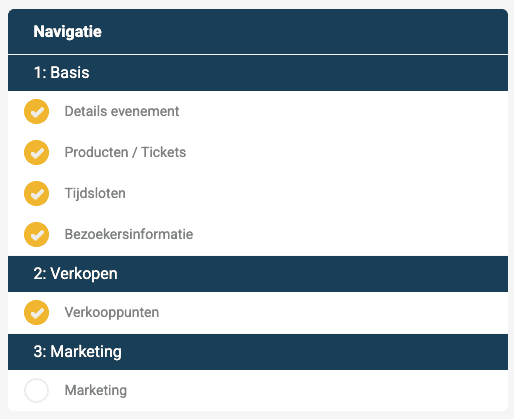
Under ‘Navigation’, click ‘Points of sale’.
5. Click ‘Add’ in the top right of the screen.
6. Give your point of sale a name. This name is only visible internally, not to ticket buyers.
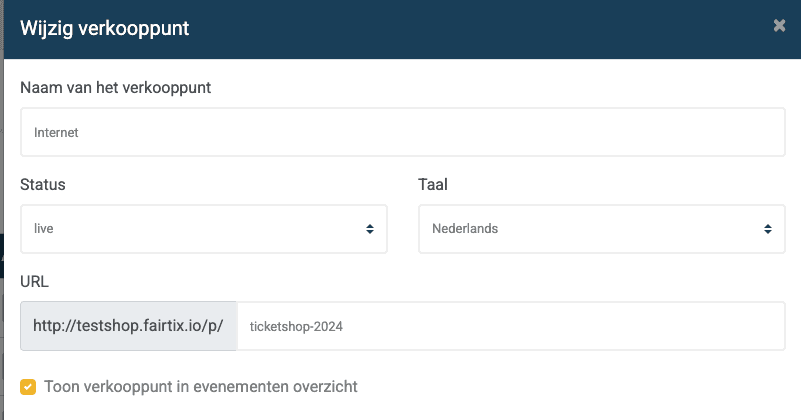
Fill in the settings of your point of sale
Status: choose Draft for a point of sale without tickets, Live for an online point of sale, Sold-out when no more tickets are visible, Archived for an archived point of sale, Box-office for door sales, or Test for a test environment.
Language: choose the language of your point of sale.
URL: refer to your event without capital letters and with hyphens.
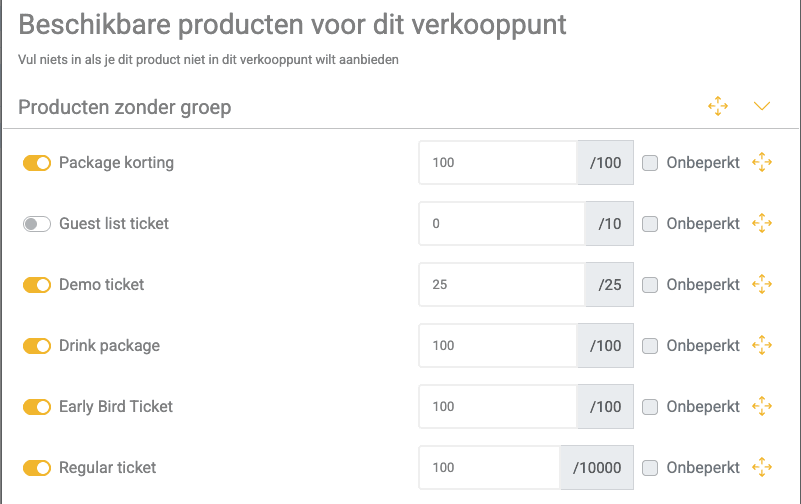
Number of tickets: choose how many tickets you want to sell per ticket type. The number must always be greater than 0.
Choose your payment methods: these are the ways ticket buyers can pay.
Optionally, choose the administration fees you want to charge visitors.
Link to terms and conditions: enter the link to the terms and conditions on your website, if you have them.
8. Click ‘Save’. Your point of sale has been created.
Info: click ‘Manage’ to edit your point of sale. Click ‘Open’ to view your point of sale.
